
Teams call queue vs auto attendant: which do you need?
An auto attendant answers a call and sends it somewhere, usually with a menu like “press 1 for sales”. A call queue holds callers and shares the calls across a group of people. Most organisations use both: an auto attendant at the front, with call queues behind it.
Step by step
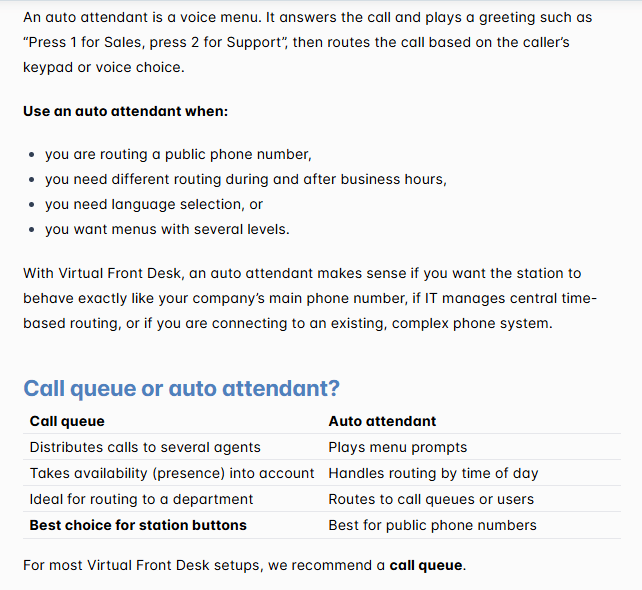
1Use an auto attendant to route
Auto attendants play greetings, offer menu options, handle business hours and holidays, and send callers to a person, a queue, voicemail or another attendant.
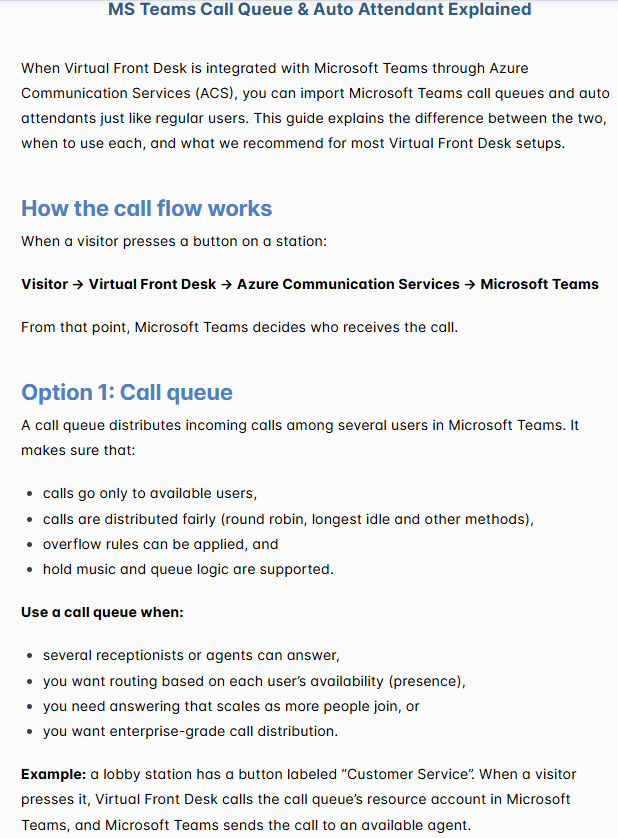
2Use a call queue to share the load
Call queues hold callers with music or messages and offer calls to agents using a routing method such as attendant, serial, round robin or longest idle.
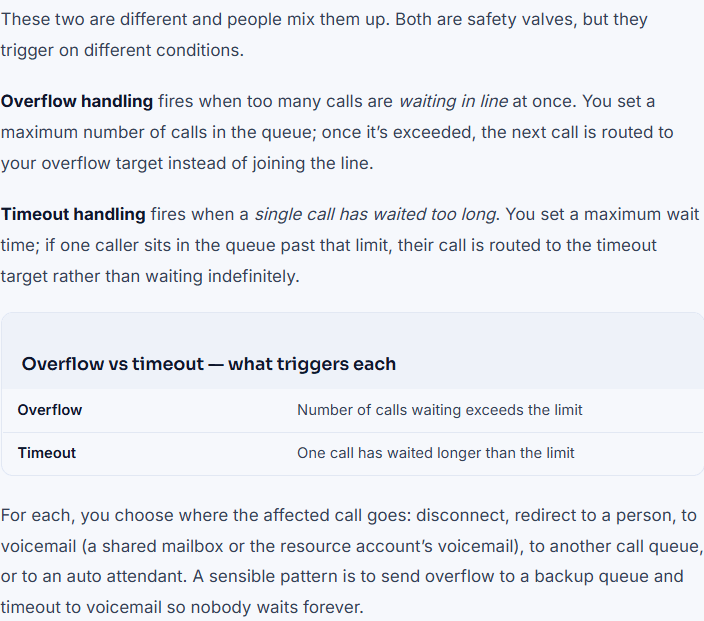
3Set overflow and timeout rules
Decide what happens when too many callers are waiting or someone has waited too long: voicemail, another queue or an external number.
4Combine them in one call flow
A typical flow is: main number → auto attendant (business hours check and menu) → call queues for each team → shared voicemail after hours.

5Train the people answering
Agents need to know how to opt in and out of queues, how to see waiting calls and what to do with calls they can’t help with.
The importance of Microsoft Teams Calling agent training
Microsoft Teams Calling agent training empowers employees to confidently manage business communications and deliver exceptional customer experiences.
By providing practical, role-based training, organisations can ensure agents understand how to effectively manage incoming and outgoing calls, transfer customer enquiries, utilise Call Queues and voicemail, and apply consistent call-handling procedures.
Well-trained agents are more productive, make fewer operational errors and are better equipped to manage customer interactions professionally.
Investing in agent training helps organisations maximise the value of their Microsoft Teams Calling solution, improve operational efficiency, reduce support requirements and enhance overall customer satisfaction.


FAQs
Can a call queue play a menu?
No, menus belong in an auto attendant. A call queue plays a greeting and music while callers wait.
Do I need a licence for each?
Auto attendants and call queues each use a resource account, which needs a Teams Phone Resource Account licence if it has a phone number.
How many menu options should we have?
Keep it to four or fewer where you can. Every extra option adds time and increases the chance callers choose wrong.
What about after hours?
Set business hours and holidays on the auto attendant so after-hours callers hear the right message and reach voicemail or an on-call number.
Want your team trained on this?
We deliver hands-on training tailored to your setup, on-site or online.